Lime Convert started because the free converters we were using kept failing in the same two ways. Either the tool did one thing and stopped short of the option we actually needed, or it buried that option under three menus and a banner ad.
So the rule here is that the common case takes one paste and no configuration, and the uncommon case is still possible without leaving the page. Options sit in the open rather than behind a settings icon.
Everything runs in your browser. Nothing is uploaded, and there is no account to make.
A word cloud makes an answer bigger each time someone else sends it. So a good icebreaker for a cloud is one where ten people out of thirty land on the same word without talking to each other.
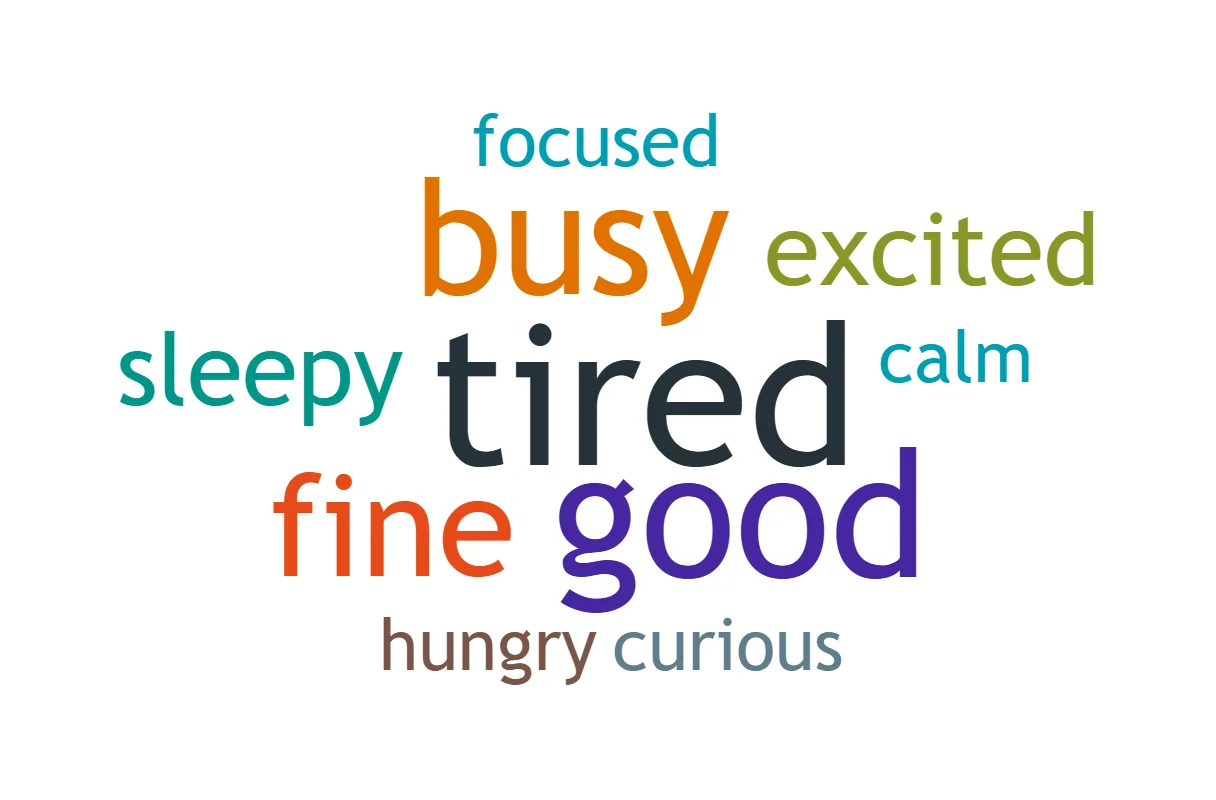
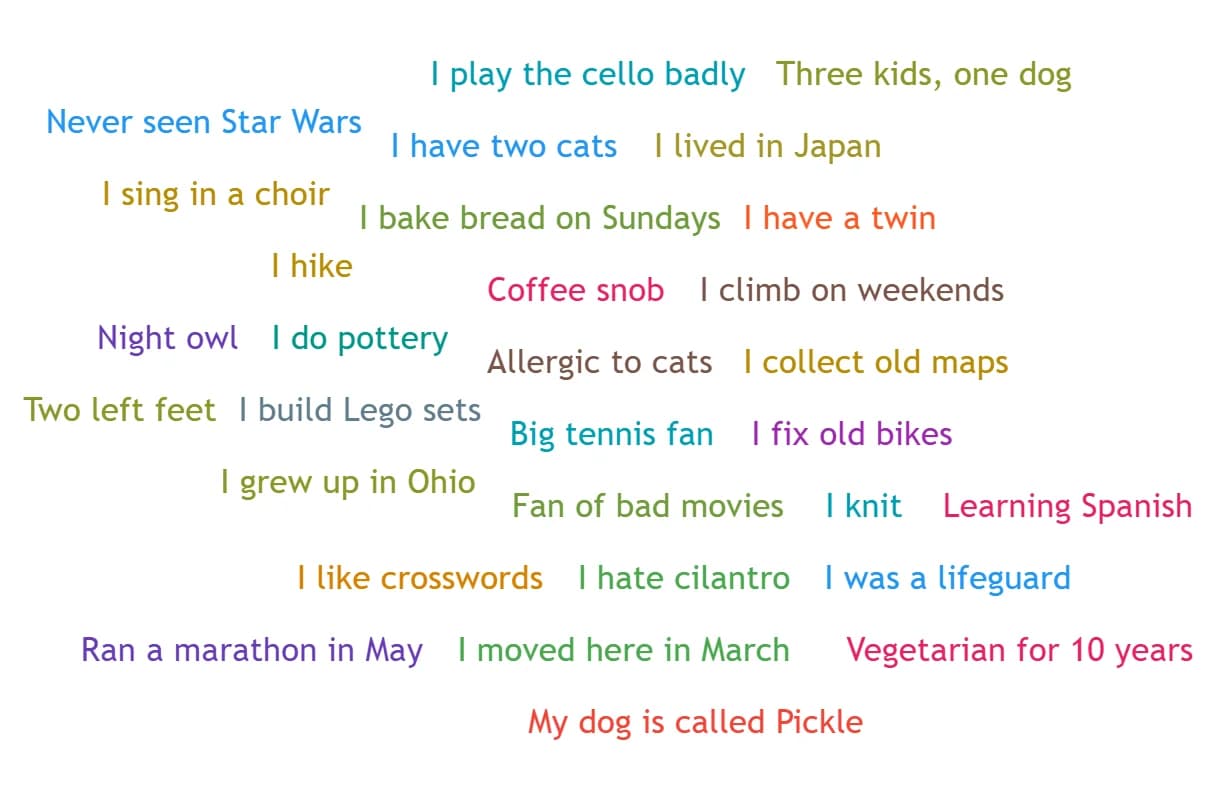
"One word for how you feel today?" does that. Most people reach for the same few words, such as tired, good, busy or fine, so those grow and the room can see its own mood in two seconds. "Tell us something about yourself" does not: thirty different sentences, all the same small size, and nothing to talk about.
Every question below is short, can be answered in one or two words, and has a small set of likely answers. Many say "one word" right in the question, which tells people how long an answer should be, and short answers are what repeat. Do the same when you write your own. Each question takes about a minute: 30 seconds to answer, 30 to look. They work in our Live Word Cloud, where people scan a QR code or type a 5-letter code and answer from their phones, and in any other word cloud tool. The Start link after a question opens the Live Word Cloud with that question already typed in.
Check-in questions for the start of a meeting
For a weekly team meeting, a standup or the first five minutes of a long call:
"One word for how you feel today?" 30 answers, 10 different. Tired, good and busy stand out.
"Tell us something about yourself" 30 answers, 30 different. Nothing stands out.
Both clouds were made in our Word Cloud Generator from example answers we wrote for this page, not from a real meeting.
The day-of-the-week question is the funny one. There are only seven possible answers, so the cloud is a few huge words, and a Wednesday meeting where "Friday" wins tells you something. On a remote call, "Where are you joining from?" gets cities, and a lot of home, kitchen and spare room.
Light questions for a social call
For a Friday call, a new team, or a group that does not know each other yet:
One word your friends would use to describe you? Start
"The first app you opened" works because most mornings start in the same few apps: email, Slack, the alarm clock. Anyone who answers TikTok gets a laugh. The tabs question gets numbers, which repeat easily, and a few "too many". Whoever has 140 open has some explaining to do.
For the emoji question, people send a single emoji, and the same emoji from ten phones counts as one answer, so it grows like any word. Anyone whose keyboard hides the right one can copy it from our Copy Emoji page.
Openers for a workshop or a training
Put your own topic in the brackets. These show what the room already thinks before you start talking:
One word that comes to mind when you hear "[topic]"? Start
The biggest obstacle to [goal], in one word? Start
One word for what you hope to take away today? Start
One thing that already works well in our team, in two words? Start
One word for what you know about [topic] so far? Start
For these, set Answers per phone to 3 answers before you start. The cloud fills faster, and the second and third answers can go past the obvious first one.
The last one pairs with the first check-in question. Ask it at the start and again at the end, download both clouds, and put them side by side. If "tired" shrank and "clear" grew, the meeting did its job.
Questions that make a bad word cloud
These are good questions for a conversation and poor ones for a cloud:
Open sentences: "Tell us something about yourself" gives thirty answers that never repeat, and the Live Word Cloud stops an answer at 30 characters anyway.
Names and titles: "Your favorite movie?" splits one film into many spellings. "The Office" and "the office!" count as one answer, but "Lord of the Rings" and "LOTR" count as two.
Yes or no: two words in a cloud is a show of hands with extra steps. Ask the room to raise them.
Anything personal about work: answers are anonymous, but they are on everyone's screen. "What frustrates you about your manager?" belongs in a one-to-one, not in a shared cloud.
When the Live Word Cloud counts, it ignores capital letters, accents, quotes around an answer and the punctuation at the end. It does not merge plurals, numbers written as words, short forms or skin tones:
Counts as one
Counts as two
Tired and tired!
cat and cats
Café and cafe
LOTR and Lord of the Rings
The Office and the office!
3 and three
"Happy" and happy
👍 and 👍🏽
A five-minute opener, step by step
One way to fill the first five minutes of a video call with the Live Word Cloud. Adjust the times to your group:
Before the call: type the question, switch on "Hide answers until I show them" and set Answers per phone to 1 answer, then press Start a live session. With the answers hidden, the people who answer last cannot copy a word that is already big.
Minute 1: share your screen with the QR code on it, and put limeconvert.com/join and the 5-letter code in the chat for anyone who would rather answer on their laptop.
Minute 2: press Timer and pick "Close answers in 30 s" while people answer. Answers close on their own, and nobody waits for the last person.
Minutes 3 to 5: press Show answers, and ask who wants to explain the biggest word.
Ready to try one? Press Start next to any question above, or open the Live Word Cloud, type your own and press Start a live session. If you already have the answers, from a survey say, paste them into the Word Cloud Generator instead.