Lime Convert started because the free converters we were using kept failing in the same two ways. Either the tool did one thing and stopped short of the option we actually needed, or it buried that option under three menus and a banner ad.
So the rule here is that the common case takes one paste and no configuration, and the uncommon case is still possible without leaving the page. Options sit in the open rather than behind a settings icon.
Everything runs in your browser. Nothing is uploaded, and there is no account to make.
This tool is for validating and verifying complete barcodes. For generating barcodes for printing, use our Barcode Generator. For calculating check digits, use our Barcode Calculator. To identify which barcode standard an unknown number follows, or to parse GS1-128 application identifiers, see EAN Check. To print the valid codes as a sheet of labels, paste them into the EAN Check barcode generator.
Amazon FBA Barcode Validation
Validate your Amazon FBA product barcodes before listing. Amazon requires valid UPC, EAN, or GTIN barcodes for most product listings. Use our bulk barcode validator to verify your barcodes meet Amazon's requirements:
UPC-A (12 digits): Standard for US Amazon listings
EAN-13 (13 digits): Required for European Amazon marketplaces
GTIN-14 (14 digits): For case/carton level identification
Avoid listing errors and rejections by validating all your product barcodes before uploading to Amazon Seller Central. Our tool checks the check digit to ensure each barcode is mathematically valid.
How to Use the Barcode Validator
To validate barcodes for Amazon FBA or any other purpose, paste them into the input field. You can paste multiple barcodes at once. Separate each barcode with a new line.
Paste your barcodes into the input field
The validation happens automatically
In the results table, you can see which barcodes are valid and which are not. The check digit is also displayed.
If the barcode was invalid, you can see the correct barcode with the correct check digit.
How to validate a barcode
A barcode is validated by calculating the last digit (known as check digit) from the other digits.
Input is:
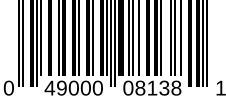
0 4 9 0 0 0 0 8 1 3 8 1
Remove the last digit, we will recalculate it.
0 4 9 0 0 0 0 8 1 3 8
Add all of the digits in the odd positions (starting from the left)
0 + 9 + 0 + 0 + 1 + 8 = 18
Multiply the sum by 3
18 x 3 = 54
Add all of the digits in the even positions
4 + 0 + 0 + 8 + 3 = 15
Add the odd position result and the even position result
54 + 15 = 69
Find the number that, when added to the result, makes the total a multiple of 10
69 + ? = 70
The check digit is 1
69 + 1 = 70
049000081381
Supported barcode types
This tool supports the following 4 barcode types:
UPC-A
12 digits
Universal Product Code (UPC) with 12 digits
UPC is a 12-digit barcode used extensively for retail packaging in the United States. UPC codes are also used in Canada, the UK, Australia, and other countries. UPC codes always have exactly 12 digits.
GTIN/EAN-13
13 digits
Global Trade Item Number (GTIN) or European Article Number (EAN) with 13 digits
GTIN-13 is used for products sold in Europe and other countries. EAN-13 is essentially the same thing, but specifically an EU standard. GTIN-13 codes are used in the US and Canada for products sold at retail point of sale. GTIN-13 codes always have exactly 13 digits.
GTIN-14
14 digits
Global Trade Item Number (GTIN) with 14 digits
GTIN-14 is used for products sold at retail point of sale. Typically this format is used for multiple product packaging, cases and pallets. GTIN-14 codes always have exactly 14 digits.
GTIN/EAN-8
8 digits
Global Trade Item Number (GTIN) or European Article Number (EAN) with 8 digits
GTIN-8 is used for products sold at retail point of sale. EAN-8 is essentially the same thing, but specifically an EU standard. Typically this format is used only for smaller products where space to print the barcode is limited. GTIN-8 codes always have exactly 8 digits.
Mastering this tool
Learn about validation - If you click on a barcode in the results table, you can choose to see the full validation process. This is a great was to learn yourself how to validate barcodes.
Barcode lookup - In the same row context menu, choose to lookup the barcode. This will open a new tab with more information about the barcode.
Generate a barcode image - If you want to generate a barcode image, click on the Generate Barcode menu item. This will open a new tab with the barcode image.
Share your results - Share your results with your friends and colleagues. Clickand share a link to this tool and optionally include your input and settings as well.
Contribute - We are always looking to improve. If you have any feedback or suggestions, please use the feedback buttonto let us know. We read every feedback and use it to improve this tool.
The Best Barcode Validator
Checks the arithmetic, and tells you which digit is wrong.
Easy - Most of the time you want to paste, convert and leave. Our Barcode Validator does that first, and keeps the rest out of the way until you need it such as bulk processing, additional barcode information and automatic barcode type detection.
Fast - Our Barcode Validator uploads nothing and waits for nothing: you get validated as you type. No waiting, just instant results.
Ad free - Our Barcode Validator is free from ads. Many other tools are cluttered with ads, but not this one.
Frequently Asked Questions
Common questions about validating barcodes, check digit algorithms, and barcode registration.
How to Verify a Barcode is Valid
Verify barcode validity by checking the check digit calculation and registration status.
Enter the barcode number in a validator tool
The tool checks the check digit calculation
Valid barcodes pass the checksum algorithm
For retail barcodes, verify the prefix matches the issuing country
Check that the company prefix is registered with GS1
How does the barcode checksum algorithm work?
UPC/EAN check digits use modulo-10: 1) Sum digits in odd positions, multiply by 3, 2) Add sum of even position digits, 3) The check digit makes total divisible by 10. Example for 12-digit: (d1+d3+d5+d7+d9+d11)x3 + (d2+d4+d6+d8+d10) + check digit equals 0 (mod 10).
What does an invalid barcode mean?
Invalid barcodes fail the checksum algorithm, meaning: a digit was mistyped, the barcode was created incorrectly, or it's a completely made-up number. Invalid barcodes won't scan correctly at registers. Always validate before printing. Note: valid checksum doesn't guarantee the number is registered with GS1.
How do I check if a barcode exists in the GS1 database?
To verify barcode registration: use GS1's GEPIR (Global Electronic Party Information Registry) at gepir.gs1.org. Enter the barcode to find the owning company. Note: not all legitimate products are in GEPIR (registration is voluntary for some data). A valid checksum doesn't guarantee database registration.