Lime Convert started because the free converters we were using kept failing in the same two ways. Either the tool did one thing and stopped short of the option we actually needed, or it buried that option under three menus and a banner ad.
So the rule here is that the common case takes one paste and no configuration, and the uncommon case is still possible without leaving the page. Options sit in the open rather than behind a settings icon.
Everything runs in your browser. Nothing is uploaded, and there is no account to make.
This tool is for generating images of barcodes. For calculating check digits, use our Barcode Calculator. For validating barcodes, use our Barcode Validator. For ITF-14 carton codes, Data Matrix, a list of up to 5 000 codes or an Avery label sheet, use the EAN Check barcode generator.
Amazon FBA Barcode Generator
Generate printable barcode images for your Amazon FBA products. Create high-quality UPC and EAN barcode images that meet Amazon's requirements for product labeling:
Print-ready quality: Generate barcodes suitable for product labels and packaging
Bulk generation: Create barcode images for your entire product catalog at once
Multiple formats: Download as PNG for printing or digital use
Customizable size: Adjust dimensions to fit your label requirements
Perfect for Amazon FBA sellers, retail businesses, warehouse management, and anyone needing professional barcode images for products or inventory.
How to Use the Barcode Generator
To generate barcodes for Amazon FBA or any other purpose, paste barcodes into the input field. You can paste multiple barcodes at once. Separate each barcode with a new line.
Paste your barcodes into the input field
The generation happens automatically
In the results table, you can pick which barcode to preview.
Adjust width, height, and other settings to your liking.
Copy, download and print individual barcodes or all of them at once.
Supported barcode types
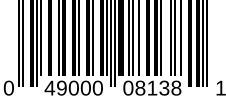
This tool supports the following 4 barcode types:
UPC-A
12 digits
Universal Product Code (UPC) with 12 digits
UPC is a 12-digit barcode used extensively for retail packaging in the United States. UPC codes are also used in Canada, the UK, Australia, and other countries. UPC codes always have exactly 12 digits.
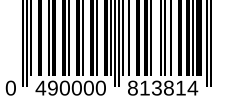
GTIN/EAN-13
13 digits
Global Trade Item Number (GTIN) or European Article Number (EAN) with 13 digits
GTIN-13 is used for products sold in Europe and other countries. EAN-13 is essentially the same thing, but specifically an EU standard. GTIN-13 codes are used in the US and Canada for products sold at retail point of sale. GTIN-13 codes always have exactly 13 digits.
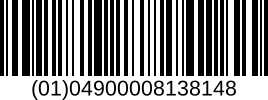
GTIN-14
14 digits
Global Trade Item Number (GTIN) with 14 digits
GTIN-14 is used for products sold at retail point of sale. Typically this format is used for multiple product packaging, cases and pallets. GTIN-14 codes always have exactly 14 digits.
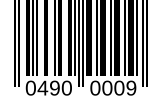
GTIN/EAN-8
8 digits
Global Trade Item Number (GTIN) or European Article Number (EAN) with 8 digits
GTIN-8 is used for products sold at retail point of sale. EAN-8 is essentially the same thing, but specifically an EU standard. Typically this format is used only for smaller products where space to print the barcode is limited. GTIN-8 codes always have exactly 8 digits.
Mastering this tool
Barcode lookup - In the same row context menu, choose to lookup more information on the barcode or generate a barcode image.
Share your results - Share your results with your friends and colleagues. Clickand share a link to this tool and optionally include your input and settings as well.
Contribute - We are always looking to improve. If you have any feedback or suggestions, please use the feedback buttonto let us know. We read every feedback and use it to improve this tool.
The Best Barcode Generator
One code or a thousand, generated as images you can print.
Easy - Most of the time you want to paste, convert and leave. Our Barcode Generator does that first, and keeps the rest out of the way until you need it such as bulk processing, additional barcode information and automatic barcode type detection.
Fast - Our Barcode Generator uploads nothing and waits for nothing: you get generated as you type. No waiting, just instant results.
Ad free - Our Barcode Generator is free from ads. Many other tools are cluttered with ads, but not this one.
Frequently Asked Questions
Common questions about creating and using barcodes for products, retail, and inventory management.
How to Create a Barcode for Your Product
Create product barcodes for retail or internal use with proper GS1 registration for legitimate sales.
Purchase a GS1 company prefix for legitimate retail barcodes
Assign unique numbers to each product in your catalog
Use a barcode generator to create the barcode image
Include the human-readable number below the barcode
Test scanning the barcode before printing production labels
What is the difference between UPC-A and UPC-E barcodes?
UPC-A uses 12 digits and is the standard retail barcode in North America. UPC-E is a compressed 8-digit version that encodes the same data using zero-suppression (removing zeros to save space). UPC-E is used for small products where full UPC-A won't fit. Both scan to the same 12-digit number.
What is a Code 128 barcode?
Code 128 is a high-density barcode encoding all 128 ASCII characters, letters, numbers, and symbols. Used for shipping labels, inventory, and logistics (not retail). Advantages include variable length, compact size, and full character set. GS1-128 extends it with application identifiers for supply chain data.
What resolution do I need for printing barcodes?
For printed barcodes: minimum 300 DPI for retail labels, 600+ DPI for small products. Vector formats (SVG, EPS) scale perfectly to any size. Minimum bar width should be 0.264mm for UPC/EAN. Always include quiet zones (blank space) on each side equal to 10x the narrow bar width. Test scan before production.
What are the size requirements for barcodes?
Standard barcode sizes: UPC-A nominal size is 1.469" x 1.02" (100% magnification), scalable 80%-200%. Minimum size for reliable scanning is about 80%. Larger barcodes improve scan speed and work at greater distances. Include 0.25" quiet zones. Small products can use UPC-E at smaller sizes.